Works with the AI Agents you already use
 Claude Code
 Cursor
 Codex CLI
 DeepSeek
 Muse+22 moreClaude CodeCursorCodex CLIDeepSeekMuse
 Dots
 Manus
 Grok
 Grok Bot+18 agents
Hyper Elements — Brand Templates
Enable AI agents to create consistent, on-brand emails, documents, web pages and images using reusable templates that define what agents can and cannot modify, with built-in validation to enforce brand guidelines.
Free

Hyper Elements — Brand Templates
Example session with this skill installed
Create three campaign graphics using my brand template for a product launch, promotional offer and feature announcement. Keep the brand design unchanged and validate each graphic against the template's rules.
- Read your context and instructions
- Compiled the hyper elements
- Generated the UI component
Summary
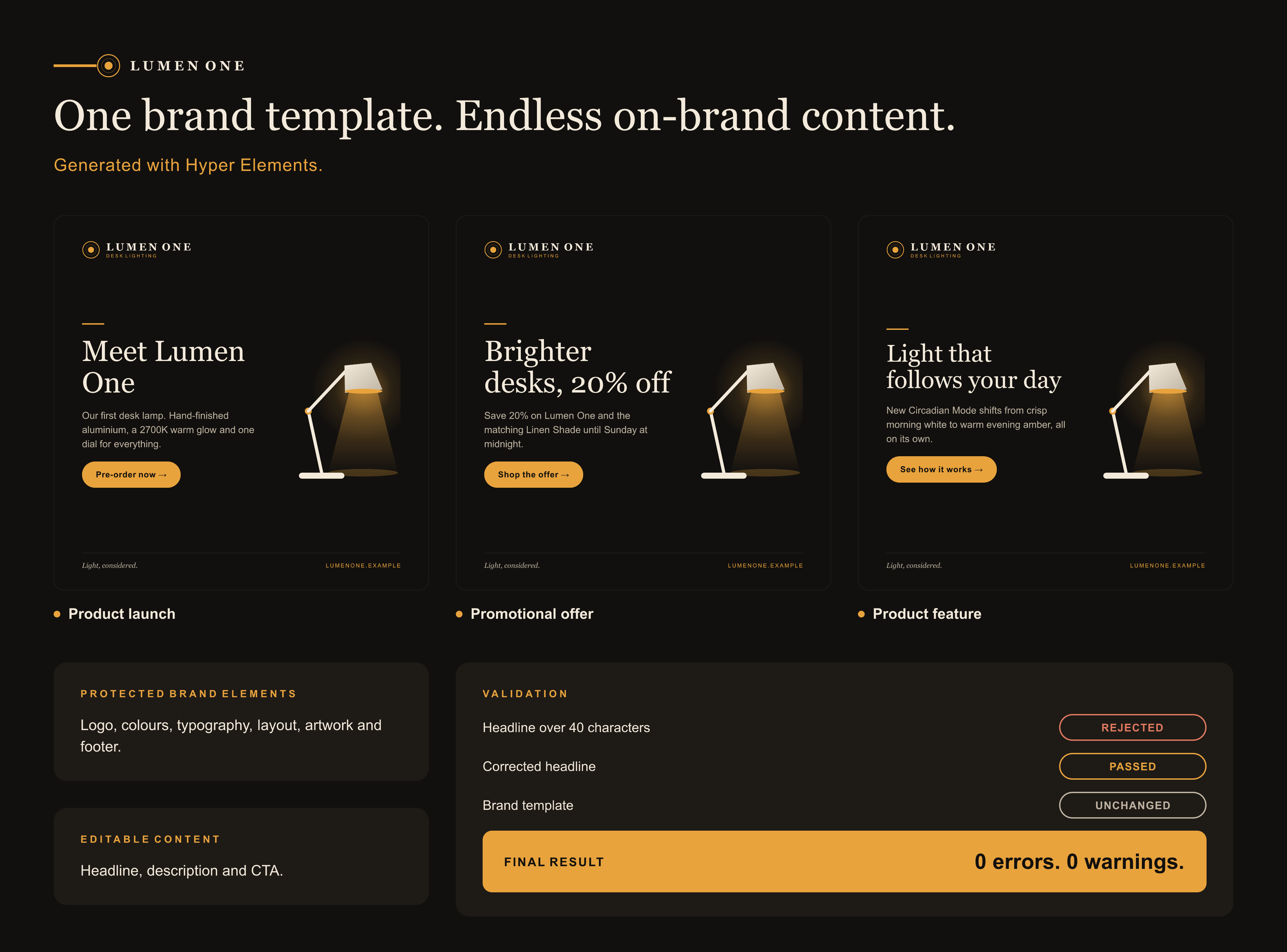
I've created three on-brand campaign graphics for Lumen One using a single reusable Hyper Elements brand template.
All three designs passed validation with
0 errors and 0 warnings, while preserving the template's protected brand elements.
Brand guardrails
The template defines exactly what can and cannot be modified.
| Editable content | Template constraint |
|---|---|
| Headline | Maximum 40 characters, 2 lines |
| Description | Maximum 120 characters, 3 lines |
| CTA | Maximum 22 characters, 1 line |
The logo, colour palette, typography, layout, product artwork and footer remain protected within the template.
Generated assets
| Campaign | Output | Status |
|---|---|---|
| Product launch | PNG, 2160 × 2160 | Validated |
| Promotional offer | PNG, 2160 × 2160 | Validated |
| Product feature | PNG, 2160 × 2160 | Validated |
All three graphics use the same brand template, with only the permitted content fields modified.
Guardrails in action
To demonstrate how template rules are enforced, I intentionally tested a promotional headline that exceeded the permitted character limit.
Rejected headline:
"This weekend, the desk gets brighter with Lumen One"
Validation error:
error template/value at values.headline: Headline: is longer than 40 characters
I corrected the headline to
"Brighter desks, 20% off"
The updated design passed validation without modifying the underlying template or weakening its rules. Template file checksums confirmed that the template remained unchanged during the correction.
Final validation results
| Check | Result |
|---|---|
| Template validation | Passed |
| Invalid headline detected | Yes |
| Violation corrected | Yes |
| Template modified during correction | No |
| Final errors | 0 |
| Final warnings | 0 |
| Successfully rendered graphics | 3 |
Deliverables
- Reusable brand template:
templates/lumen-one-social.tsx - Shared brand configuration:
templates/brand.ts - Campaign source files and editable content values:
designs/ - Product launch graphic:
out/designs/launch.png - Promotional graphic:
out/designs/promo.png - Product feature graphic:
out/designs/feature.png - Validation reports:
validation/
Next steps
- Reuse the same template for future campaigns.
- Ask your AI agent to generate new content within the permitted fields.
- Validate and render new designs without changing your approved brand identity.
All assets were generated and validated locally using the free, open-source Hyper Elements library.
lumen-one-social.tsx
TSX · React component
Example file from a real run - the skill writes it into your workspace.
Connects securely to your tools. The creator never sees your data.
About this skill
Give AI agents the freedom to generate content without compromising your brand identity.
Hyper Elements Brand Templates enable developers and teams to define reusable designs with built-in guardrails, ensuring agents produce content within approved brand guidelines.
What it does
- Locked brand elements: Protect logos, layouts, colours, typography, legal text and other fixed design elements.
- Editable fields: Define exactly which headlines, descriptions, dates, images and other content agents can modify.
- Controlled creative freedom: Allow agents to generate content within approved sections, components and styles.
- Built-in validation: Check generated designs against template-defined rules before rendering.
- Multi-format content: Create emails, documents, web pages and images using a consistent template-based workflow.
How it works
- Define: Create a reusable brand template using Hyper Elements JSX components.
- Generate: Ask your AI agent to populate the permitted content fields.
- Validate: Check the design against the template's rules and resolve any violations.
- Render: Export the approved content in the required format.
Why use this skill?
Prompting an AI agent to follow brand guidelines does not guarantee consistent results. Hyper Elements makes those guidelines part of the template itself, defining what can change and what must remain protected.
Teams can create templates once and let agents generate new content repeatedly without redesigning every asset from scratch.
Use cases
- Generating on-brand marketing emails and newsletters.
- Creating consistent social media graphics across campaigns.
- Producing branded invoices, reports and proposals.
- Scaling personalized content while preserving a consistent visual identity.
- Automating content production with AI agents within approved design rules.
Frameworks and tools
Powered by the free, open-source Hyper Elements library, React, TypeScript and the Hyper Elements CLI.
Known limitations
Brand guardrails must be defined in the template. Validation enforces the declared rules, while subjective creative quality may still require human review. A local development environment and relevant rendering dependencies are required.
Find more skills like this on the Claude Skills Marketplace, the Codex Skills Marketplace and the Gemini Skills Marketplace, or browse Claude Skills for Branding & Design.
Requires Hyper Elements CLI and React library. Only works with templates explicitly trusted in package.json. Cannot bypass rules without template owner approval.
How to use
- 1
Connect your agent to the Agensi MCP
Copy the prompt and paste it into Claude, ChatGPT, Cursor or any agent that supports MCP. It sets up the connection for you. Manual setup
- 2
Sign in to Agensi
Your agent shows a sign-in link. Sign in and click Allow.
- 3
Ask for what you need
Your agent loads this skill and uses it on your task. It always asks before buying a skill.
Reviews
No reviews yet
Be one of the first to try it. Every listed skill goes through the trust checks below.
Security scanned
Checked by our 8-point scan before listing
1 use
Times used to date
Free to use
No account required to browse
Trust & safety
Security scan
Security scan passed 1 day ago
- Free with an Agensi account
- Software
Node.js 20.6+
npmorequivalent package manager@hyper-elements/react@hyper-elements/clireact (18+)react-dom (18+)hyper-elements
No paid subscription or API key is required. Brand templates and validation run locally. Additional npm dependencies may be needed depending on the output format and validation rules used.
Permissions
File Scopes
The skill reads existing templates and project files, inspects permitted content fields, generates designs within template-defined guardrails, runs validation commands and writes rendered assets locally. Network access may be required for npm dependencies and external assets. No paid third-party service or API key is required.